
本文作者原创,首发在本博客;CSDN 上的同名文章已标注为转载并回链到本页:https://blog.csdn.net/qq_30220519/article/details/139637038
创作不易,小小的支持一下吧!


本文作者原创,首发在本博客;CSDN 上的同名文章已标注为转载并回链到本页:https://blog.csdn.net/qq_30220519/article/details/139637038
本文作者原创,首发在本博客;CSDN 上的同名文章已标注为转载并回链到本页:https://blog.csdn.net/qq_30220519/article/details/139627776
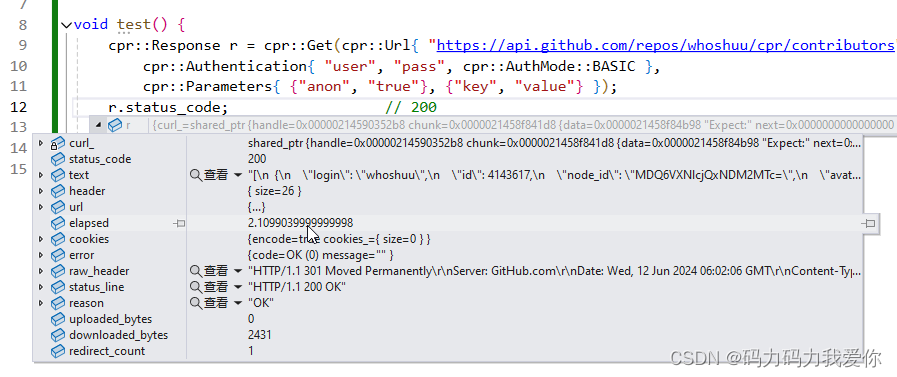
GitHub - libcpr/cpr: C++ Requests: Curl for People, a spiritual port of Python Requests.
GitHub - psf/requests: A simple, yet elegant, HTTP library.
1 |
|
本文作者原创,首发在本博客;CSDN 上的同名文章已标注为转载并回链到本页:https://blog.csdn.net/qq_30220519/article/details/139608711
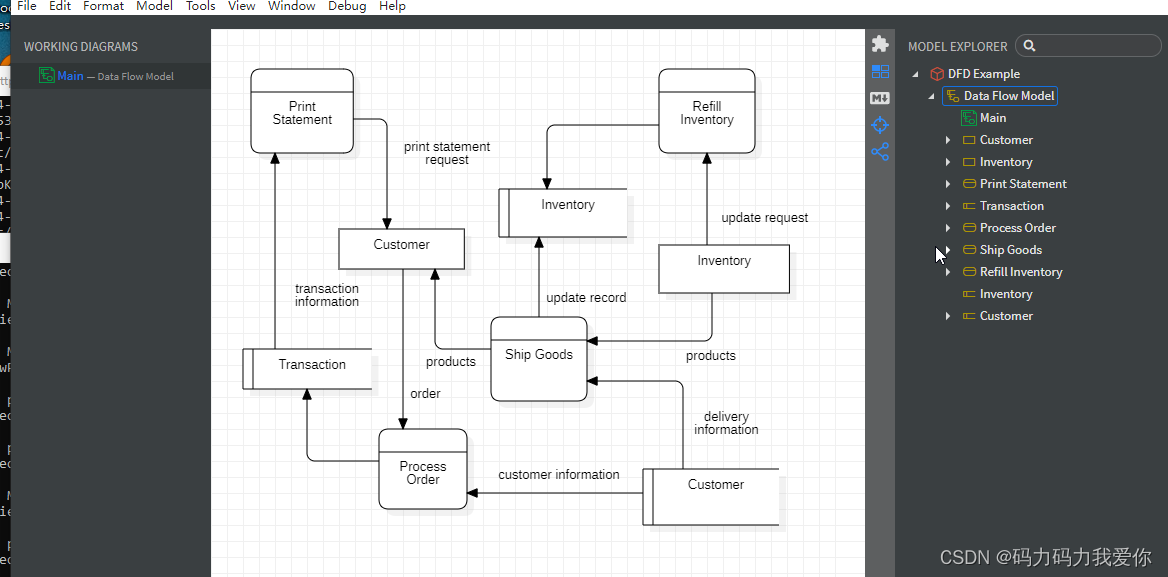
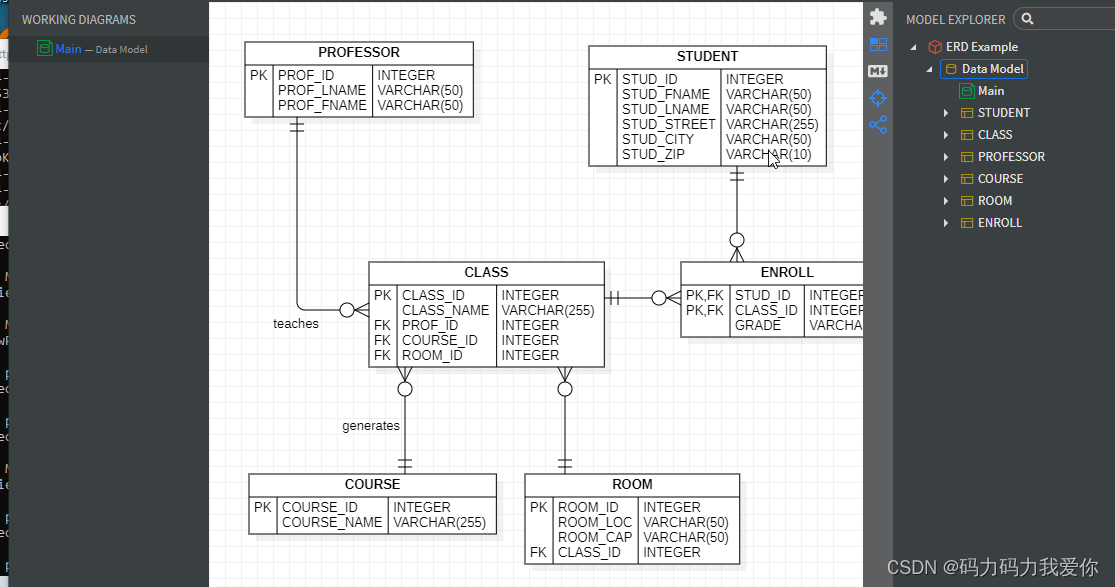
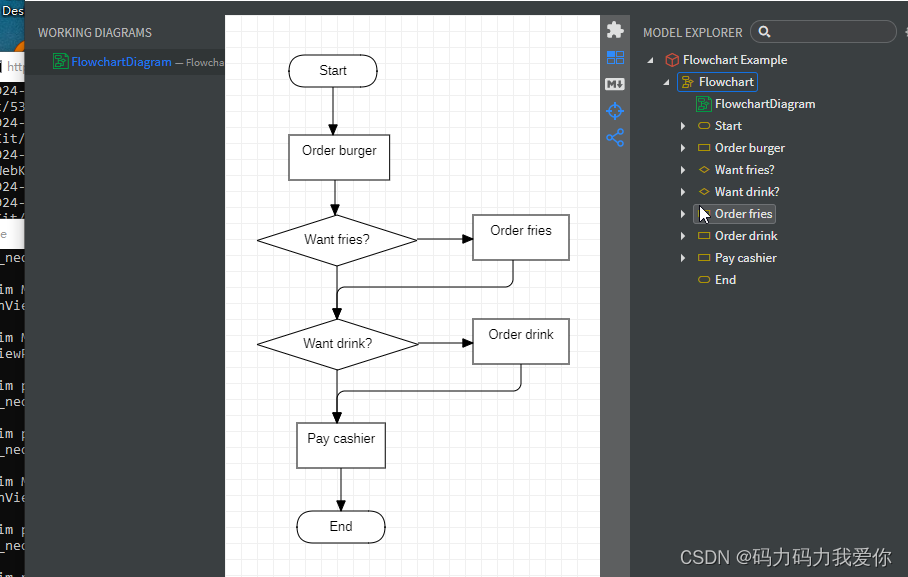
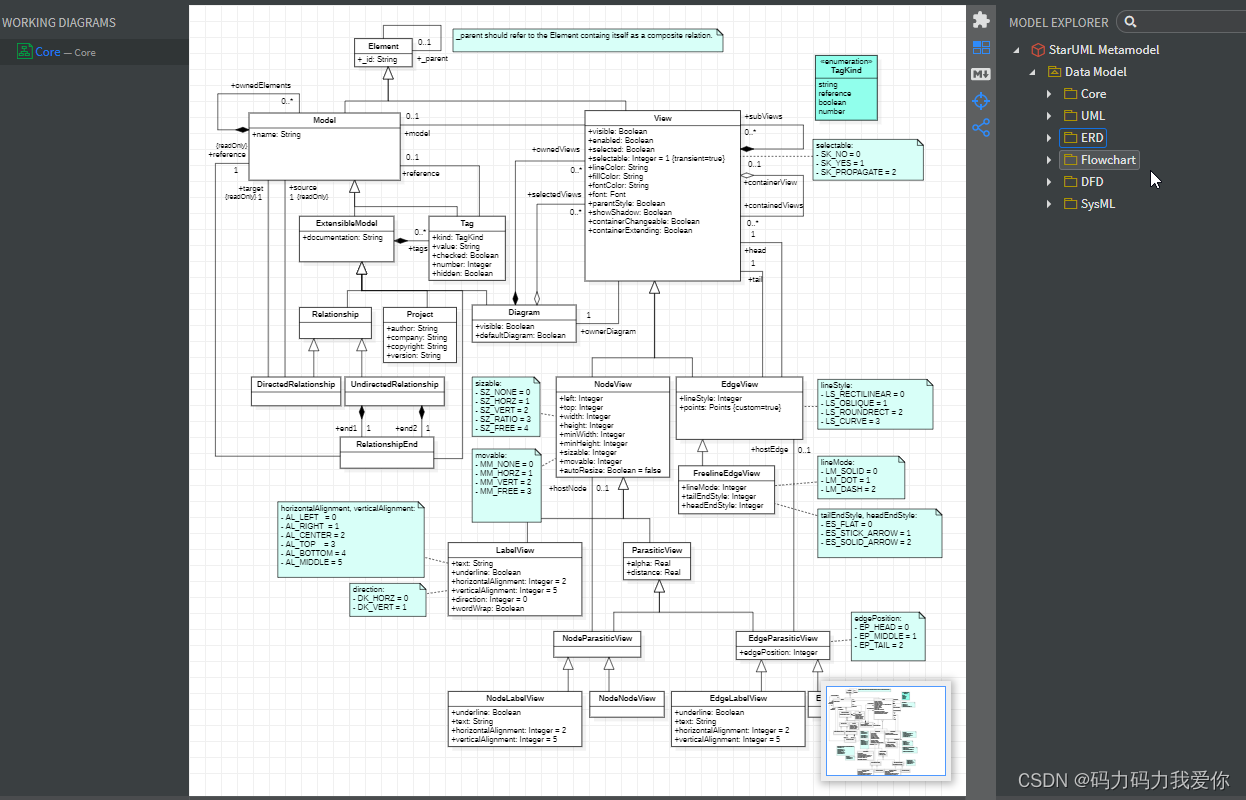
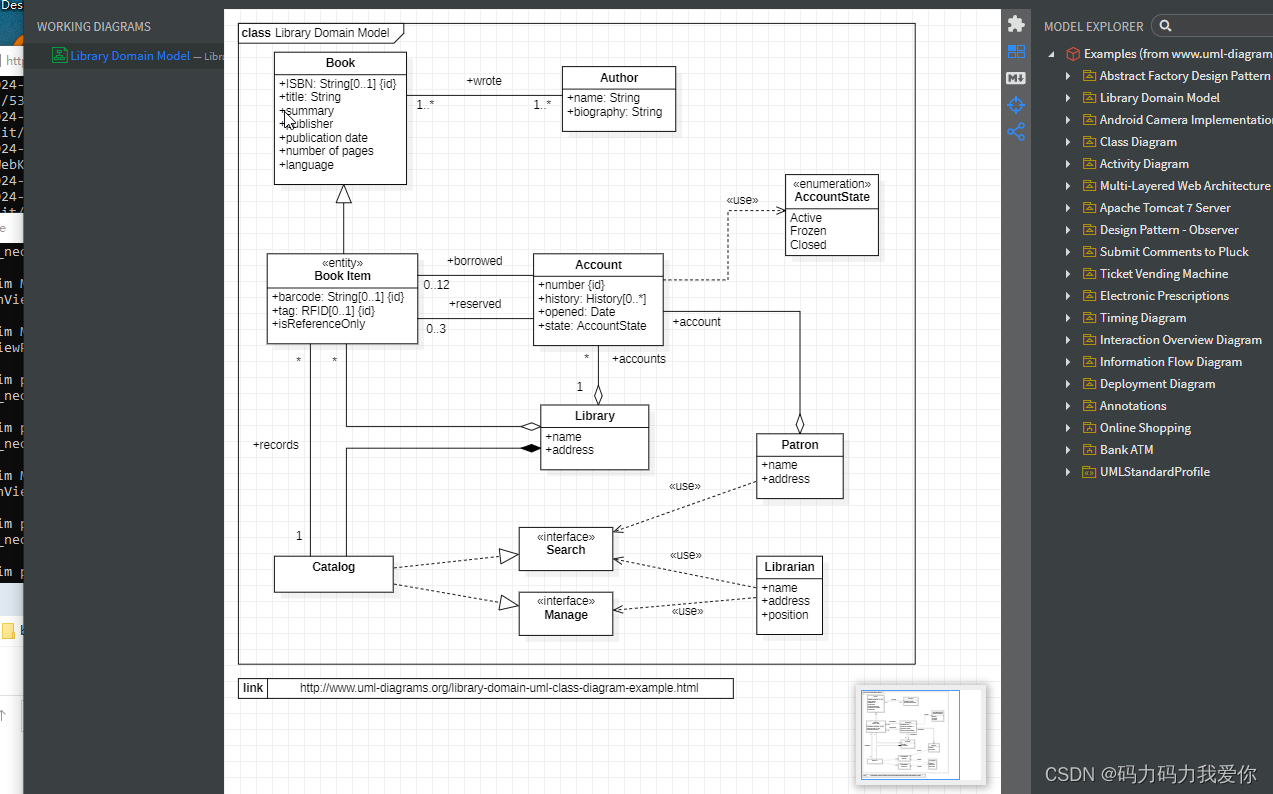
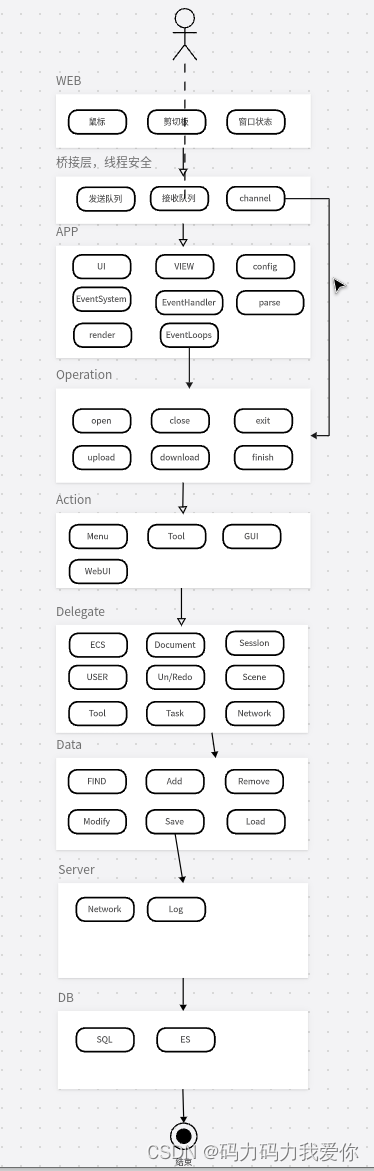
参考
app.asar附件资源可免激活
JHBlog/设计模式/设计模式/1、StarUML使用简明教程.md at master · SunshineBrother/JHBlog · GitHub
C++程序员UML实务手册代码 - 开发实例、源码下载 - 好例子网
GitHub - dimon4ezzz/whitestaruml: UML modeling tool derived from StarUML compatible with Windows
本文作者原创,首发在本博客;CSDN 上的同名文章已标注为转载并回链到本页:https://blog.csdn.net/qq_30220519/article/details/139574266
__declspec(selectany) 支持h文件定义全局变量,重复包含不报错
int i = 2; //变量i还是不用加volatile修饰
#define ACCESS_ONCE(x) (*(volatile typeof(x) *)&(x))
#define READ_ONCE(x) ACCESS_ONCE(x)
#define WRITE_ONCE(x, val) ({ ACCESS_ONCE(x) = (val); })
a = READ_ONCE(i);
WRITE_ONCE(i, 2);
volatile仅仅是保证int的地址对齐,而对齐后的×××在现代处理器中,是能够做到原子性读写的。
在C++中volatile具有以下特性:
//CAS作为最基础的RMW操作,其他所有RMW操作都可以通过CAS来实现
bool CAS( int * pAddr, int nExpected, int nNew )
atomically {
if ( *pAddr == nExpected ) {
*pAddr = nNew ;
return true ;
}
else
return false ;
}
//CAS变种
int CAS( int * pAddr, int nExpected, int nNew )
atomically {
if ( *pAddr == nExpected ) {
*pAddr = nNew ;
return nExpected ;
}
else
return *pAddr;
}
//例如 fetch-and-add(FAA)
int FAA( int * pAddr, int nIncr )
{
int ncur = *pAddr;
do {} while ( !compare_exchange( pAddr, ncur, ncur + nIncr ) ;//compare_exchange失败会返回当前值于ncur
return ncur ;
}
在C++11的原子lib中,主要有以下RMW操作:
std::atomic<>::fetch_sub()
std::atomic<>::fetch_and()
std::atomic<>::fetch_or()
std::atomic<>::fetch_xor()
std::atomic<>::exchange()
std::atomic<>::compare_exchange_strong()
std::atomic<>::compare_exchange_weak()
//实现自己需要的原子RMW操作,我们需要一个原子对内存中值执行乘法,也就是 atomic fetch_multiply
uint32_t fetch_multiply(std::atomic<uint32_t>& shared, uint32_t multiplier)
{
uint32_t oldValue = shared.load();
while (!shared.compare_exchange_weak(oldValue, oldValue * multiplier))
{
}
return oldValue;
}
//对结构体进行原子修改
struct Terms
{
uint32_t x;
uint32_t y;
};
std::atomic terms;
void atomicFibonacciStep()
{
Terms oldTerms = terms.load();
Terms newTerms;
do
{
newTerms.x = oldTerms.y;
newTerms.y = oldTerms.x + oldTerms.y;
}
while (!terms.compare_exchange_weak(oldTerms, newTerms));
}
//是不是在内部加了锁
std::atomic<> template包含了一个is_lock_free()成员来用于判断该原子类型是原子操作是否是lock-free的。
—同时满足以下条件的原子类的原子操作才能做出是lock-free的保证
我们必须加上编译器的barrier来防止编译器的乱序优化:
#define COMPILER_BARRIER() asm volatile(“” ::: “memory”)
int Value;
int IsPublished = 0;
void sendValue(int x)
{
Value = x;
COMPILER_BARRIER(); // prevent reordering of stores
IsPublished = 1;
}
int tryRecvValue()
{
if (IsPublished)
{
COMPILER_BARRIER(); // prevent reordering of loads
return Value;
}
return -1; // or some other value to mean not yet received
}
//cache同步
Write Invalidate(置无效):当一个CPU Core修改了一份数据X,那么它需要通知其他core将他们的cache中的X设置为无效(invalid)
Write Update(写更新):当一个CPU Core修改了一份数据X,那么它需要通知其他core将他们的cache中的X更新到最新值(如果cache中有的话)
//cache间MESI协议就包含了描述共享的状态
M(Modified): cache line数据有效,但是数据被修改过了,本Cache中的数据是最新的,内存的数据是老的,需要在适当时候将Cache数据写回内存。该cache将数据及其控制权传递到其他cache中,或者cache需要负责将数据写回到memory中,而这些操作都需要在reuse该cache line之前完成。
E(Exclusive):cache line数据有效,并且cache和memory中的数据是一致的,同时数据只在本cache中有效。直接reuse该cacheline(将cacheine中的数据丢弃,用作他用)
S(Shared):cache line的数据有效,并且cache和memory中的数据是一致的,同时该数据在多个cpu cache中也是有效的。直接reuse该cacheline(将cacheine中的数据丢弃,用作他用)
I(Invalid):本cache line的数据已经是无效的。处于invalid状态的cacheline是空的,没有数据。当新的数据要进入cache的时候,优选状态是invalid的cacheline,之所以如此是因为如果选中其他状态的cacheline,则说明需要替换cacheline数据,而未来如果再次访问这个被替换掉的cacheline数据的时候将遇到开销非常大的cache miss。
//在MESI协议中,每个CPU都会监听总线(bus)上的其他CPU对每个Cache line的所有操作,因此该协议也称为监听(snoop)协议
通常情况下,CPU需要以下几个通信message即可:
Read消息:read message用来获取指定物理地址上的cacheline数据
Read Response消息:该消息携带了read message请求的数据。read response可能来自memory,也可能来自其他的cache。例如:如果一个cache有read message请求的数据并且该cacheline的状态是modified,那么该cache必须以read response回应这个read message,因为该cache中保存了最新的数据。
Invalidate消息:该命令用来将其他cpu cache中的数据设定为无效。该命令携带物理地址的参数,其他CPU cache在收到该命令后,必须进行匹配,发现自己的cacheline中有该物理地址的数据,那么就将其移除并用Invalidate Acknowledge回应。
Invalidate Acknowledge消息: 收到invalidate message的cpu cache,在移除了其cache line中的特定数据之后,必须发送invalidate acknowledge消息。
Read Invalidate消息: 该message中也包括了物理地址这个参数,以便说明其想要读取哪一个cacheline数据。此外,该message还同时有invalidate message的功效,即其他的cache在收到该命令后,移除自己cacheline中的数据。因此,Read Invalidate message实际上就是read+invalidate。发送Read Invalidate之后,cache期望收到一个read response以及多个invalidate acknowledge。
Writeback消息: 该message包括两个参数,一个是地址,另外一个是写回的数据。该消息用在modified状态的cacheline被驱逐出境(给其他数据腾出地方)的时候发出,该命名用来将最新的数据写回到memory(或者其他的CPU cache中)
##Store Buffer
在CPU和cache之间增加store buffer这个HW block。
那么cpu 0无需等待其他CPU的相应,只需要将要修改的内容放入store buffer,然后继续执行就OK了。当cache line完成了bus transaction,并更新了cache line的状态后,要修改的数据将从store buffer进入cache line。
这种设计叫做store forwarding,当CPU执行load操作的时候,不但要看cache,还有看store buffer是否有内容,如果store buffer有该数据,那么就采用store buffer中的值。store forwarding解决了CPU 0的cache line和store buffer间的数据一致性问题。
smp_mb内存屏障。保证多核CPU的store buffer内容一致,保证store buffer完全写入cache line之前,其他数据不能先更新cache line。
###为了保证MESI协议的正确性,CPU在需要发出某个变量的a的MESI协议消息的时候,需要检查invalidate queue中是否有该变量a的invalidate消息,如果有需要先出来完成这个invliadte消息后,才能发出正确的MESI协议消息。
#无论哪一种cpu都遵守下面的规则:
[1]、从CPU自己的视角看,它自己的memory order是服从program order的
[2]、从包含所有cpu的sharebility domain的角度看,所有cpu对一个共享变量的访问应该服从若干个全局存储顺序
[3]、memory barrier需要成对使用
[4]、memory barrier的操作是构建互斥锁原语的基石


本文作者原创,首发在本博客;CSDN 上的同名文章已标注为转载并回链到本页:https://blog.csdn.net/qq_30220519/article/details/139573246
1 | public delegate void NumManipulationHandler(NumEventArgs e); |
1 | using System; |
1 | using System; |
1 | using System; |
GitHub - HandyOrg/HandyControl: Contains some simple and commonly used WPF controls
https://github.com/OfficeDev/Image-FileHandler
https://github.com/probot/no-response
https://github.com/dotnet/Open-XML-SDK
https://github.com/OfficeDev/PnP-WOPI
https://github.com/OfficeDev/Open-XML-SDK
https://github.com/OfficeDev/Excel-IO
GitHub - cnxy/files-uwp: A modern file explorer that pushes the boundaries of the platform.
Code of Conduct | Microsoft Open Source
https://github.com/CollaboratingPlatypus/PetaPoco
https://www.cnblogs.com/zhangweizhong/p/3718549.html
NuGet Gallery | PetaPoco 5.1.304
https://www.cnblogs.com/zhangweizhong/category/855479.html
https://www.cnblogs.com/zhangweizhong/category/771056.html
https://github.com/LonelyCodelang?tab=repositories
https://worktile.com/share/files/64a3b9c8ec0a4d3d81b89a630177c880
https://github.com/statianzo/PostLog
https://www.cnblogs.com/zhangweizhong/category/771055.html
https://github.com/statianzo/Fleck
https://github.com/EasyHttp/EasyHttp
需ngnix反向代理,账号admin,密码abc123.搭建个人云盘
https://gitee.com/dotnetchina/BootstrapAdmin
dotNET China: 让 .NET 开发更简单,更通用,更流行。
GitHub - files-community/Files: Building the best file manager for Windows
GitHub - MMmmmoko/Bongo-Cat-Mver: An Bongo Cat overlay written in C++
本文作者原创,首发在本博客;CSDN 上的同名文章已标注为转载并回链到本页:https://blog.csdn.net/qq_30220519/article/details/139567313
1 | D: |
1 |
|
1 |
|
https://github.com/Sneezry/chrome_extensions_and_apps_programming
综述–扩展开发文档
https://developer.chrome.com/extensions/manifest
{
“app”: {
“background”: {
“scripts”: [“background.js”]
}
},
“manifest_version”: 2,
“name”: “My Extension”,
“version”: “versionString”,
“default_locale”: “en”,
“description”: “A plain text description”,
“icons”: {
“16”: “images/icon16.png”,
“48”: “images/icon48.png”,
“128”: “images/icon128.png”
},
“browser_action”: {
“default_icon”: {
“19”: “images/icon19.png”,
“38”: “images/icon38.png”
},
“default_title”: “Extension Title”,
“default_popup”: “popup.html”
},
“page_action”: {
“default_icon”: {
“19”: “images/icon19.png”,
“38”: “images/icon38.png”
},
“default_title”: “Extension Title”,
“default_popup”: “popup.html”
},
“background”: {
“scripts”: [“background.js”]
},
“content_scripts”: [
{
“matches”: [“http://www.google.com/\*"\],
“css”: [“mystyles.css”],
“js”: [“jquery.js”, “myscript.js”]
}
],
“options_page”: “options.html”,
“permissions”: [
“*://www.google.com/\*”
],
“web_accessible_resources”: [
“images/*.png”
]
}
npm install -d node-sass@4.12.0 –registry=https://registry.npm.taobao.org –SASS_BINARY_SITE=https://npm.taobao.org/mirrors/node-sass/ –PHANTOMJS_CDNURL=https://npm.taobao.org/mirrors/phantomjs/
GitHub - qmlweb/qmlweb: A QML engine in a web browser. Current state: fixing things…
vue2-elm: 基于 vue2 + vuex 构建一个具有 45 个页面的大型单页面应用
Orchid-02/基于bootstarp的仿京东购物首页 大二实训
GitHub - changkun/changkun-blog-clients: Changkun’s Blog Desktop&Mobile Client
https://blog.csdn.net/luanpeng825485697/column/info/17191
https://github.com/sashafierce/pdf.js
https://github.com/public-apis/public-apis
https://tauri.studio/en/docs/getting-started/setup-windows
https://github.com/zhaojun1998/zfile
https://gitee.com/docmirror/dev-sidecar
https://github.com/avwo/whistle
https://github.com/jspreadsheet/ce
https://github.com/bnoordhuis/gyp/blob/master/test/additional-targets/src/all.gyp
https://gitee.com/fanjiatian/pc-end-qq
https://gitee.com/fanjiatian/contour-waterfall
https://github.com/chadluo/CSS-Guidelines/blob/master/README.md
https://developer.mozilla.org/zh-CN/docs/Web/CSS/CSS_Lists_and_Counters/Using_CSS_counters
https://github.com/CNOliverZhang/PotatofieldImageToolkit/
https://github.com/jgraph/drawio-diagrams
GitHub - electron/electron-api-demos: Explore the Electron APIs
https://github.com/microsoft/Web-Dev-For-Beginners
Orchid-02/基于Vue调用网易云音乐API的在线音乐播放WebApp
https://gitee.com/Orchid-02/WebStoping
https://github.com/FortAwesome/Font-Awesome
Lighthouse首页、文档和下载 - 自动化网络审查工具 - OSCHINA - 中文开源技术交流社区
Color Safe - accessible web color combinations
JavaScript | CSS-Tricks - CSS-Tricks
Operator Lookup - Search JavaScript operators
Flexbox Froggy - A game for learning CSS flexbox
Grid Garden - A game for learning CSS grid | Codepip
https://developer.mozilla.org/en-US/docs/Web/API/HTML_Drag_and_Drop_API
“align-items” | Can I use… Support tables for HTML5, CSS3, etc
Live Server - Visual Studio Marketplace
https://developer.mozilla.org/en-US/docs/Web/Events
https://developer.mozilla.org/en-US/docs/Web/API/Canvas_API
https://github.com/collections/javascript-game-engines
Microsoft Azure PlayFab | Full Stack LiveOps, Real-time Control
https://codepen.io/gsarig/pen/gOwXpRa
iView / View Design 一套企业级 UI 组件库和前端解决方案
https://github.com/nuxt/nuxt.js
https://github.com/kazupon/vue-i18n
Layout 布局 (组件) - Element UI 中文开发手册 - 开发者手册 - 腾讯云开发者社区-腾讯云
https://iviewui.com/components/pro/word-count
渐进式网络应用程序 - Webpack 中文文档 - 开发文档 - 文江博客
webpack 中使用 workbox 实现 PWA_webpack workbox!-CSDN博客
https://unpkg.com/electron-releases@3.646.0/lite.json
https://github.com/docmirror/dev-sidecar
GitHub - RelaxedJS/ReLaXed: Create PDF documents using web technologies
GitHub - jzj1993/jquery.popup: 一款简单易用的网页弹窗插件
本文作者原创,首发在本博客;CSDN 上的同名文章已标注为转载并回链到本页:https://blog.csdn.net/qq_30220519/article/details/139566971
mpiexec -n 8 $PROCESS_COUNT x64\Debug\$TARGET.exe 多进程并发启动
mpiexec -f hosts.txt -n 3 $PROCESS_COUNT x64\Debug\$TARGET.exe 联机并发进程,其它联机电脑需在相同路径下有所有程序
//hosts.txt
192.168.86.16
192.168.86.123
192.168.86.108
1 |
|
win10环境下vs2013+mpich2并行环境搭建_vs2013 mpich-CSDN博客
MPI并行环境配置(Windows 10+VSIDE Community 2019)_amd mpi并行-CSDN博客
windows下安装mpich2_如何安装spmd。exe-CSDN博客
Index of /static/downloads/1.4
本文作者原创,首发在本博客;CSDN 上的同名文章已标注为转载并回链到本页:https://blog.csdn.net/qq_30220519/article/details/139549350
npm install -g electron-forge
electron-forge init my-project –template=vue
npm start //进入目录启动
//打包成一个目录到out目录下,注意这种打包一般用于调试,并不是用于分发
npm run package
//打出真正的分发包,放在out\make目录下
npm run makenpx @electron-forge/cli@latest import
npx create-electron-app my-appnpm install mousetrap //快捷键绑定库
npm install worker_threads //工作线程模块
npm install worker-loader //
npm init //C++项目目录下初始化项目
npm install –global –production windows-build-tools
npm install -g electron-prebuilt
git clone https://github.com/electron/electron-quick-start
cd electron-quick-start
npm install && npm startcnpm install electron-packager -g
“scripts”: {“package”:”electron-packager . HelloWorld –platform=win32 –arch=x64 –icon=computer.ico –out=./out –asar –app-version=0.0.1 –overwrite –ignore=node_modules”
}
npm run package
GitHub - electron/electron-api-demos: Explore the Electron APIs
@python “%~dp0gyp_main.py” %*
1 |
|
V8_EXPORT
V8_INLINE
v8::Handle<
v8::Local<
const v8::Arguments
const v8::FunctionCallbackInfov8::Value& 不定参数
Localtpl = FunctionTemplate::New(isolate);
G
String::NewFromUtf8Literal(isolate, “isNull”)
String::Cast
isolate->GetCurrentContext()
NODE_SET_PROTOTYPE_METHOD(tpl, “x”, X);
1 | const qt = require("./lib/qt"); |
GitHub - NickCis/nodeQt: Qt binding for Node
GitHub - a7ul/mdview-nodegui: A Markdown editor in NodeGui
GitHub - kusti8/node-qt-napi: Node.js bindinds for Qt5, using NAPI
GitHub - nodegui/qode: DEPRECATED: Please see https://github.com/nodegui/qodejs instead
GitHub - svalaskevicius/qtjs-generator: Qt API bindings generator for Node.js
GitHub - nodegui/nodegui-starter: A starter repo for NodeGui projects
GitHub - anak10thn/qhttpserver: HTTP server implementation for Qt based on node.js’ http parser
GitHub - anak10thn/chrome-app-samples: Chrome Apps
GitHub - fwestrom/qtort-microservices: A simple micro-services framework for Node.js.
GitHub - ivan770/PiQture: Screenshot tool based on Electron
GitHub - miskun/qtc-sdk-node: Qt Cloud Services SDK for Node.js
v8: include/v8.h File Reference
node-gyp -j 8 configure
node-gyp -j 8 build
“install”: “node-gyp -j 8 rebuild –arch=ia32”
“install”: “node-gyp -j 8 rebuild –arch=x86”
1 | set PRJ_PATH=E:\workspace\test\Web-Dev-For-Beginners\nodeqt |
1 | git config --global user.name "your-name" |
[GitHub - electron/electron-api-demos: Explore the Electron APIsExplore the Electron APIs. Contribute to electron/electron-api-demos development by creating an account on GitHub.

https://github.com/electron/electron-api-demos](https://github.com/electron/electron-api-demos “GitHub - electron/electron-api-demos: Explore the Electron APIs”)[Quick Start | ElectronThis guide will step you through the process of creating a barebones Hello World app in Electron, similar to electron/electron-quick-start.
https://electronjs.org/docs/tutorial/quick-start](https://electronjs.org/docs/tutorial/quick-start “Quick Start | Electron”)[https://github.com/electron/electron-quick-start
https://github.com/electron/electron-quick-start](https://github.com/electron/electron-quick-start “https://github.com/electron/electron-quick-start“) GitHub - qtoolkit/qtk: QTK 是一套基于HTML5 Canvas实现的, 专注于桌面/移动应用程序开发的框架。
https://github.com/sindresorhus/awesome-electron
GitHub - atom/atom: :atom: The hackable text editor
GitHub - nodejs/node-addon-api: Module for using Node-API from C++
缺失模块。
1、请确保node版本大于6.2
2、在博客根目录(注意不是yilia根目录)执行以下命令:
npm i hexo-generator-json-content --save
3、在根目录_config.yml里添加配置:
  jsonContent:
    meta: false
    pages: false
    posts:
      title: true
      date: true
      path: true
      text: false
      raw: false
      content: false
      slug: false
      updated: false
      comments: false
      link: false
      permalink: false
      excerpt: false
      categories: false
      tags: true